


Rallies.ai portfolio tracking lets you monitor your stock holdings, view real-time performance, analyze allocation by sector and asset type, and track gains and losses across your entire portfolio in one centralized dashboard. The platform automatically syncs price data and calculates key metrics like total return, daily changes, and portfolio weight for each position, eliminating manual spreadsheet updates and providing instant visibility into your investment performance.
Key Takeaways
- Rallies.ai portfolio tracking automatically updates stock prices in real-time, calculating your total portfolio value, daily changes, and individual position performance without manual data entry
- The portfolio dashboard displays allocation breakdowns by sector, market cap, and geographic region, helping you identify concentration risk and diversification gaps
- You can track multiple portfolios simultaneously—useful for separating taxable and retirement accounts or comparing different investment strategies
- Watchlist features let you monitor stocks you're researching without adding them to your active portfolio, with customizable price alerts for entry and exit points
- Integration with the AI Research Assistant means you can ask questions about your portfolio holdings directly from the tracking interface and get instant analysis
Table of Contents
- What Is Portfolio Tracking on Rallies.ai?
- Getting Started with Portfolio Setup
- How to Add and Manage Positions
- Understanding Your Portfolio Dashboard
- Analyzing Portfolio Allocation and Diversification
- Tracking Performance and Returns
- Using Watchlists and Price Alerts
- Accessing Your Portfolio on Mobile
- Integration with Research and Screening Tools
- Common Portfolio Tracking Mistakes
What Is Portfolio Tracking on Rallies.ai?
Portfolio tracking on Rallies.ai is a feature that monitors your stock holdings, calculates real-time performance metrics, and visualizes your investment allocation across sectors and asset types. The tool automatically pulls current price data for each position, eliminating the need for manual spreadsheet updates or logging into multiple brokerage accounts to check performance.
Unlike basic watchlists that only show stock prices, the portfolio tracker calculates your actual gains and losses based on your purchase prices and share quantities. It displays total portfolio value, daily dollar and percentage changes, individual position performance, and allocation percentages. This gives you a complete picture of your investment performance in a single view.
The portfolio tracking system is separate from your actual brokerage accounts—you manually input your holdings, but Rallies.ai doesn't execute trades or connect directly to your broker. This means your data stays private, and you maintain full control over what information you track. For investors who hold positions across multiple brokerages or want to monitor hypothetical portfolios, this approach offers flexibility without security concerns about linking bank credentials.
Portfolio Tracking: A system that monitors your investment holdings, automatically updates their current value based on live market prices, and calculates performance metrics like total return and allocation percentages. It helps investors understand how their investments are performing without manual calculations.
Getting Started with Portfolio Setup
Setting up your portfolio on Rallies.ai takes about 5-10 minutes for a typical portfolio of 10-20 stocks. You'll start by creating a new portfolio from the portfolio dashboard, giving it a descriptive name like "Main Portfolio," "Retirement Account," or "Growth Strategy."
For each stock you own, you'll need three pieces of information: the ticker symbol, number of shares, and your average purchase price per share. If you bought shares at different times and prices, calculate your average cost basis by dividing total dollars invested by total shares owned. For example, if you bought 10 shares at $100 and 10 shares at $120, your average cost is $110 per share ((10×$100 + 10×$120) ÷ 20 shares).
You can add positions one at a time through the interface or bulk import if you're setting up a large portfolio. The system validates ticker symbols as you enter them and pulls the current stock price so you can verify you're adding the correct security. Once added, positions immediately begin tracking with real-time price updates during market hours.
Many investors create multiple portfolios to separate different account types or strategies. You might have one portfolio for your taxable brokerage account, another for your IRA, and a third for speculative positions. This separation helps you track performance by strategy and ensures you're considering tax implications when making decisions about specific holdings.
How to Add and Manage Positions
Adding a new position requires entering the ticker symbol, share quantity, and cost basis. The cost basis should reflect your actual purchase price per share, including any transaction fees if you want precise return calculations. If you're unsure of your exact cost basis, check your brokerage's tax documents or account statements, which typically show this information for each holding.
When you sell shares or add to an existing position, you'll need to update the entry. If you sell part of a position, reduce the share count and recalculate your average cost basis if needed. If you're adding shares, input the new purchase as a separate transaction or update your total share count and recalculate the weighted average cost basis. Some investors track each purchase separately to monitor which lots are profitable, though this requires more detailed record-keeping.
For dividend-paying stocks, you can choose whether to factor reinvested dividends into your position tracking. If you participate in a dividend reinvestment plan (DRIP), those additional shares should be added to your total count with their purchase prices. This keeps your portfolio tracking aligned with your actual brokerage holdings and provides accurate return calculations that include dividend reinvestment.
The portfolio interface lets you edit or delete positions at any time. If you've completely exited a stock, you can remove it from your active portfolio while keeping the historical record for tax purposes or performance analysis. This flexibility means your tracked portfolio can evolve as your actual holdings change, maintaining accuracy without cluttering your dashboard with old positions.
Understanding Your Portfolio Dashboard
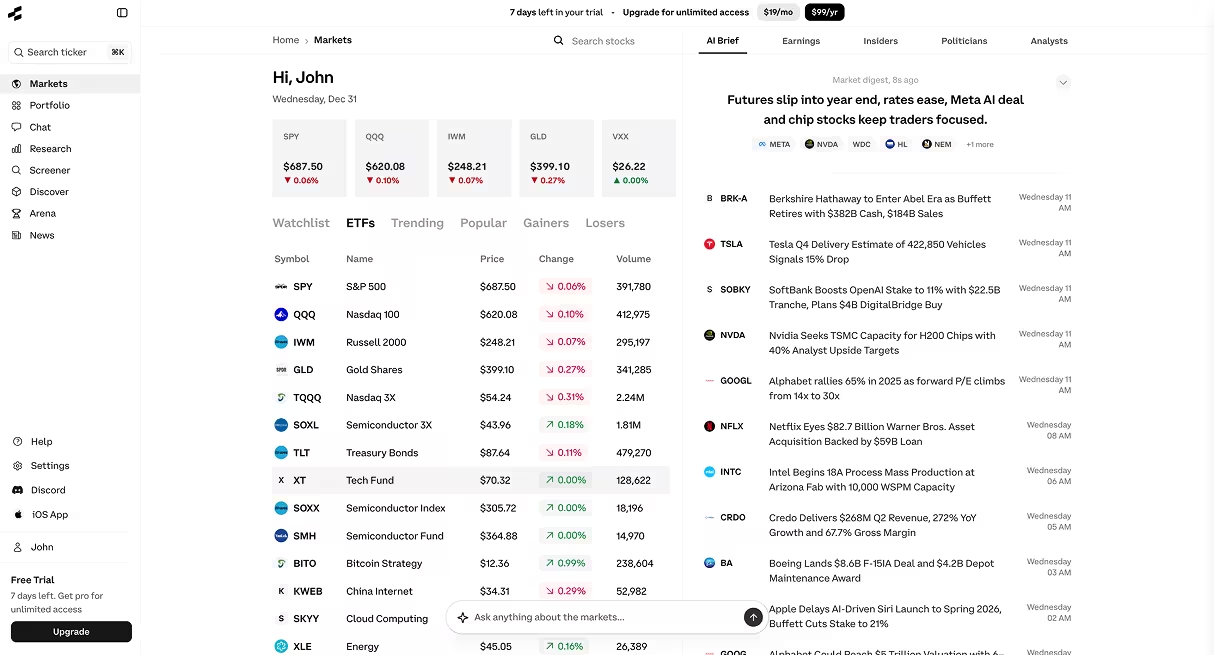
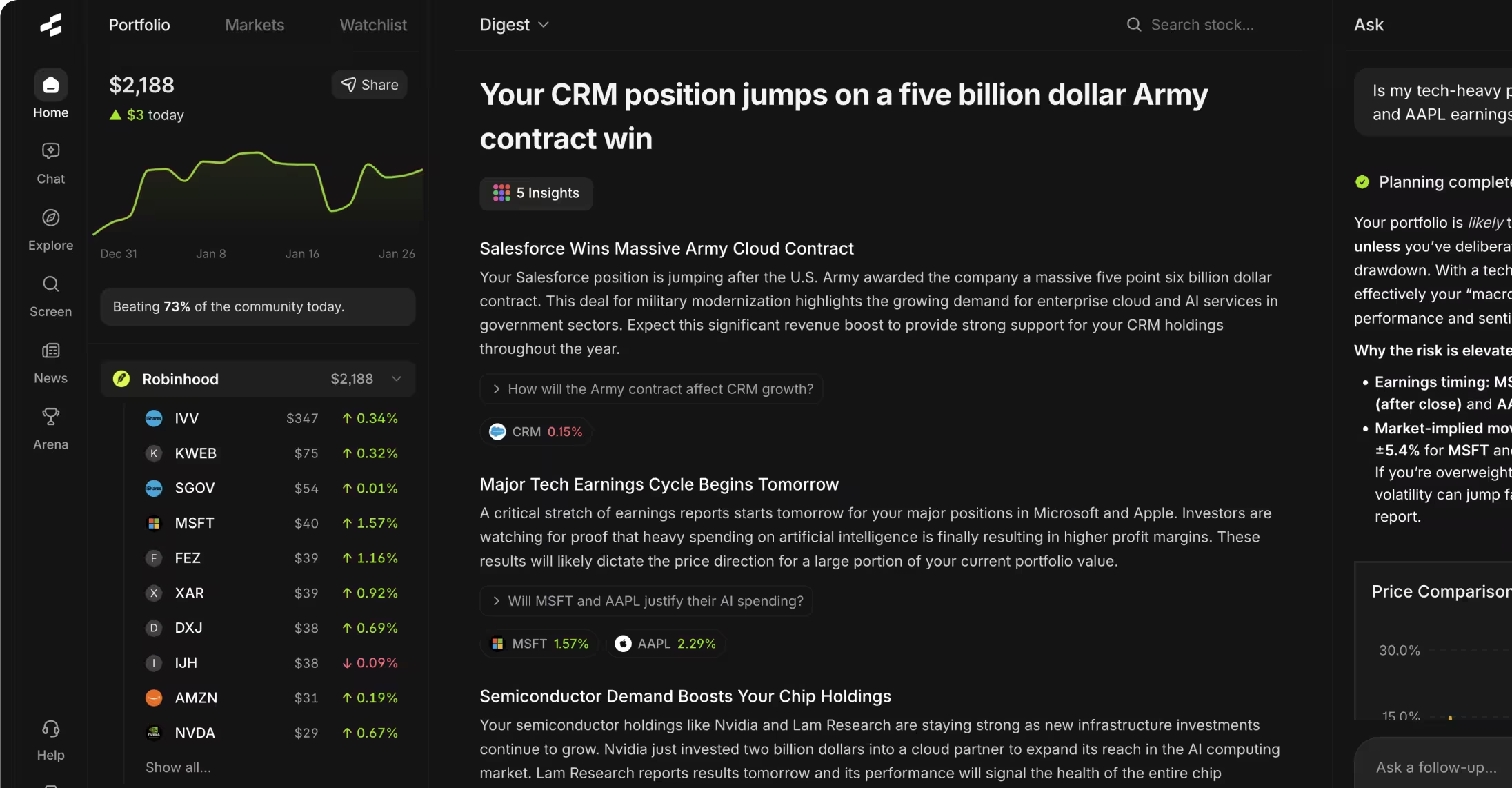
The portfolio dashboard displays your total portfolio value prominently at the top, along with today's dollar and percentage change. Below that, you'll see a list of all holdings sorted by portfolio weight (percentage of total value) by default, though you can re-sort by daily performance, total gain/loss, or alphabetically by ticker.
Each position shows its current price, number of shares you own, total position value, cost basis, and unrealized gain or loss in both dollars and percentage terms. Color coding (typically green for gains, red for losses) provides visual cues about performance at a glance. Clicking into any position takes you to that stock's detailed research page, where you can access financials, news, and AI-powered analysis.
The dashboard updates during market hours as prices change. You'll see your portfolio value fluctuate in real-time, which can be useful for active monitoring but may increase emotional responses to short-term volatility. Some investors prefer to check their portfolios less frequently—daily or weekly rather than continuously—to avoid overreacting to normal market movements.
Customization options let you adjust the dashboard view to highlight information most relevant to your investment approach. You can toggle between seeing dollar amounts or percentages, show or hide certain columns, and set your preferred default sort order. These settings persist across sessions, so your dashboard displays consistently each time you return.
Analyzing Portfolio Allocation and Diversification
The allocation analysis tools break down your holdings by sector, market capitalization, and geographic region. Sector allocation shows what percentage of your portfolio is invested in technology, healthcare, financials, consumer goods, and other industry categories. This helps identify concentration risk—if 60% of your portfolio is in technology stocks, you're heavily exposed to that sector's performance.
Market cap allocation divides your holdings into large-cap (typically companies worth over $10 billion), mid-cap ($2-10 billion), and small-cap (under $2 billion) categories. Different market cap segments behave differently during market cycles. Large-cap stocks tend to be more stable but slower-growing, while small-cap stocks offer higher growth potential with increased volatility. A balanced portfolio often includes exposure across multiple cap ranges.
Sector Allocation: The distribution of your investment dollars across different industry sectors like technology, healthcare, or energy. Tracking sector allocation helps you avoid overconcentration in one area of the economy, which could increase risk if that sector underperforms.
Geographic allocation shows your exposure to U.S. versus international markets. Most U.S.-focused investors maintain 70-90% domestic allocation, with the remainder in international stocks for geographic diversification. If you only own U.S. stocks, you're missing exposure to growth in other economies and assuming all companies you invest in operate exclusively domestically, which isn't true for most large corporations.
Allocation Type What It Shows Why It Matters Sector Industry concentration Identifies single-sector risk exposure Market Cap Company size distribution Balances growth potential vs. stability Geographic Regional market exposure Reduces country-specific economic risk
When reviewing allocation data, compare your current breakdown to your target allocation. If you intended to maintain 30% in technology but it's grown to 45% due to strong performance, you might consider rebalancing by trimming tech winners and adding to underweighted areas. This disciplined approach forces you to sell high and buy low rather than letting momentum drive portfolio composition.
Tracking Performance and Returns
Performance tracking shows both realized and unrealized gains across different time periods. Unrealized gains are paper profits on positions you still own—your stock is up 20%, but you haven't sold yet. Realized gains occur when you actually sell a position for more than you paid. The portfolio tracker focuses primarily on unrealized gains since it tracks current holdings, not your complete trading history including closed positions.
Total return calculations include both price appreciation and dividends received. A stock that's up 8% in price and paid 2% in dividends delivered a 10% total return. If your portfolio tracking doesn't account for dividends, you're understating performance, especially for dividend-focused strategies. Make sure you understand whether your displayed returns include dividend income or only reflect capital gains.
Time-weighted returns show how your portfolio performed over a specific period, useful for comparing against benchmark indexes like the S&P 500. If your portfolio returned 12% over the past year while the S&P 500 returned 15%, you underperformed the market by 3 percentage points. This comparison helps evaluate whether your stock selection and allocation decisions added value compared to simply buying a broad market index fund.
Individual position performance rankings reveal which stocks are contributing most to your overall returns. Typically, a small number of holdings drive most portfolio gains—you might find that 3-4 winners account for 80% of your total profits while other positions are flat or down. This distribution is normal and reflects the reality that most stocks deliver average returns while a few outliers generate exceptional gains. Recognizing this pattern can inform decisions about portfolio concentration and position sizing.
Using Watchlists and Price Alerts
Watchlists let you monitor stocks you're researching or considering for purchase without adding them to your active portfolio. You might maintain a watchlist of 20-30 stocks you've identified through screening or research, tracking their prices and news while you conduct deeper analysis. This keeps your main portfolio view focused on actual holdings while still providing easy access to companies on your radar.
Price alerts notify you when a watched stock hits a specific price level. You can set alerts for both upside and downside targets—for example, alerting you if a stock you want to buy drops to $50 per share, or if a stock you own rises to $100 where you plan to take profits. Alerts help you act on predetermined price levels without constantly checking stock prices throughout the day.
Many investors use watchlists to track stocks they've sold or are considering selling. If you exit a position but want to monitor whether it continues rising (confirming your sell decision) or falls (validating your timing), adding it to a watchlist keeps it on your radar. You can also watch competitors of companies you own to understand relative performance within a sector.
Watchlist alerts can be delivered through the Rallies mobile app, pushing notifications to your phone when trigger prices are hit. This real-time notification system means you don't need to actively monitor the market during trading hours, reducing screen time while staying informed about significant price movements in stocks you care about.
Accessing Your Portfolio on Mobile
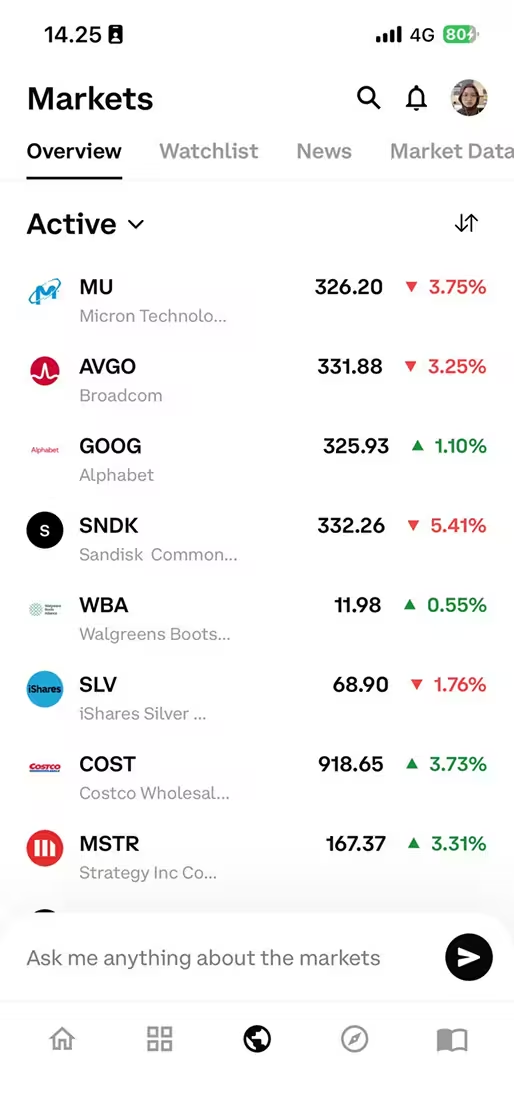
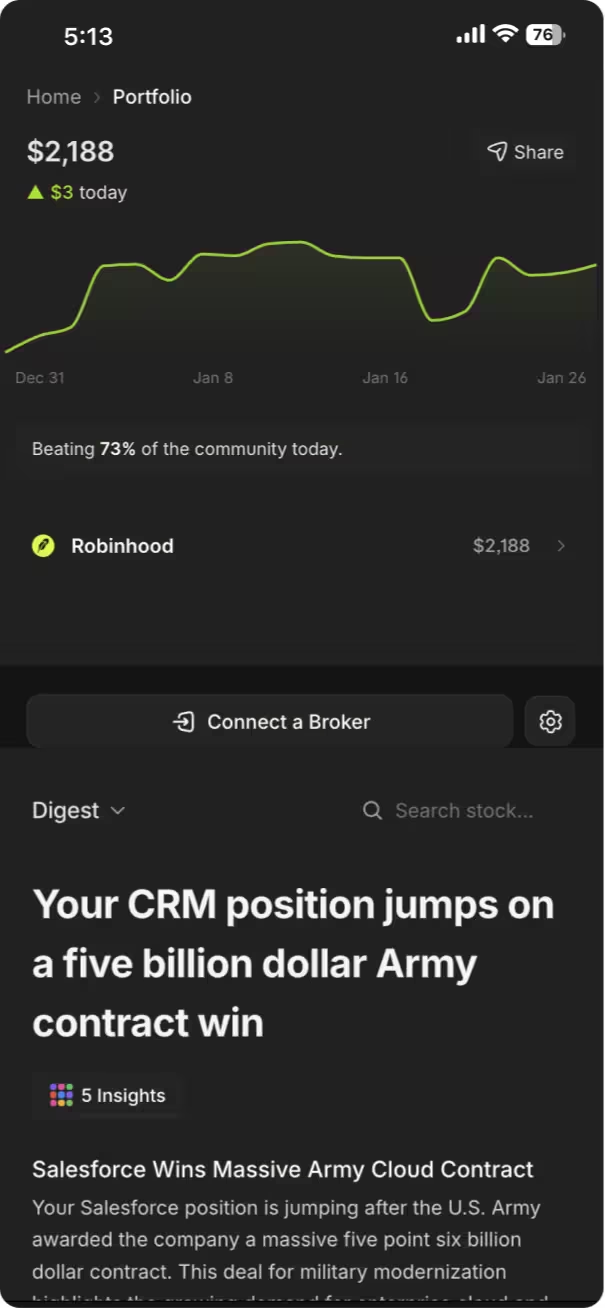
The Rallies mobile app provides full portfolio tracking functionality on iOS devices, letting you check your holdings, review performance, and update positions from your phone. The mobile interface is optimized for quick checks—you can see your total portfolio value and daily change within seconds of opening the app, without navigating through multiple screens.
Mobile access is particularly useful for investors who want to monitor portfolios during the trading day without sitting at a computer. You can check how your holdings are responding to market news, earnings releases, or broader market movements while commuting, traveling, or away from your desk. The app syncs with your web portfolio automatically, so changes made on mobile appear on desktop and vice versa.
Push notifications for watchlist alerts come through the mobile app, making it easy to act on price targets you've set. If you receive an alert that a watched stock hit your target price, you can immediately open the app to review current conditions and decide whether to execute a trade through your brokerage. While Rallies.ai doesn't execute trades directly, the mobile app provides the information you need to make informed decisions quickly.
The mobile app also includes access to the AI Research Assistant, letting you ask questions about portfolio holdings directly from your phone. You might ask "What's driving Apple's move today?" or "How does Microsoft's valuation compare to its 5-year average?" and get instant analysis without switching to a browser or research platform. This integration keeps portfolio monitoring and research in a single workflow.
Integration with Research and Screening Tools
Portfolio tracking connects with Rallies.ai's other features to create an integrated research workflow. From any position in your portfolio, you can click through to that company's full research page, which consolidates financials, analyst ratings, news, and AI-generated analysis. This eliminates the need to manually search for each stock you own when you want to review recent developments or update your thesis.
The Vibe Screener can be used alongside portfolio tracking to identify portfolio gaps or find similar companies. If your allocation analysis reveals you're underweight in healthcare, you can use the screener to find healthcare stocks matching your investment criteria, then add promising candidates to your watchlist for further research. This creates a complete loop from portfolio analysis to opportunity identification to position tracking.
For investors using Rallies.ai's AI Research Assistant, portfolio integration means you can ask questions that reference your actual holdings. Rather than asking generic questions about stocks, you can query "Which of my portfolio companies have earnings next week?" or "Show me the P/E ratios for all my technology holdings." This context-aware research capability saves time and keeps analysis focused on stocks you actually own.
The thematic portfolios feature lets you compare your holdings against model portfolios built around specific investment themes. If you're trying to build an artificial intelligence-focused portfolio, you can see which AI-related stocks you're missing and whether your current holdings align with the theme. This comparison helps ensure your portfolio composition matches your intended investment thesis, not just a collection of unrelated stock picks.
Common Portfolio Tracking Mistakes
The most frequent mistake is entering incorrect cost basis information, which makes all gain/loss calculations wrong. If you're not sure of your exact purchase prices, check your brokerage's cost basis records rather than guessing. Even small errors compound across multiple positions, potentially showing your portfolio up 10% when it's actually up 5%, leading to overconfidence in your investment decisions.
Failing to update positions after trades is another common issue. If you sell half of a position but don't update your tracked holdings, your portfolio will show artificial losses as the market cap you "own" doesn't match reality. Set a reminder to update your Rallies portfolio whenever you execute a trade, or do a full reconciliation weekly to ensure tracked positions match your actual brokerage holdings.
Over-monitoring portfolio performance can lead to emotional decision-making. Checking your portfolio value hourly encourages reactions to normal intraday volatility that has no bearing on long-term investment outcomes. Unless you're an active day trader, checking portfolio performance once per day or even once per week provides sufficient information without increasing anxiety about short-term fluctuations. Research on investor behavior consistently shows that those who check portfolios less frequently tend to make better long-term decisions.
Advantages of Regular Portfolio Tracking
- Identifies allocation drift requiring rebalancing
- Reveals concentration risk before it becomes problematic
- Provides data for tax-loss harvesting decisions
- Tracks whether investment strategy is working
Limitations of Portfolio Tracking
- Shows only current positions, not complete trading history
- Requires manual updates after each trade
- Can encourage overtrading if checked too frequently
- Doesn't account for cash holdings or non-equity assets
Ignoring dividend reinvestment creates tracking errors for income-focused portfolios. If your brokerage automatically reinvests dividends but you don't add those shares to your portfolio tracker, your tracked position will diverge from reality over time. For a 3% yielding stock held for five years with dividend reinvestment, this could mean your actual position is 15-16% larger than what your tracker shows, significantly understating your true holdings and returns.
Focusing solely on portfolio value without reviewing allocation means you miss important risk signals. Your portfolio might be up 30% for the year, but if that's entirely driven by one stock that now represents 40% of your holdings, you've taken on concentrated risk that could reverse quickly. Regular allocation reviews—monthly or quarterly—help you maintain the diversification profile you intended rather than letting winners dominate through momentum.
Frequently Asked Questions
1. Does Rallies.ai connect directly to my brokerage account?
No, Rallies.ai portfolio tracking does not connect to brokerage accounts or execute trades. You manually enter your positions and Rallies.ai tracks their performance based on real-time market data. This approach keeps your brokerage credentials secure since you're not linking financial accounts, though it means you need to update positions manually when you make trades.
2. How often does the portfolio tracker update stock prices?
The portfolio tracker updates stock prices in real-time during market hours (9:30 AM - 4:00 PM ET on trading days). Your portfolio value and position gains/losses refresh automatically as prices change, typically with updates every few seconds. After market close, prices reflect the closing values until markets reopen the next trading day.
3. Can I track multiple portfolios separately?
Yes, you can create and maintain multiple portfolios within Rallies.ai. This is useful for separating taxable and retirement accounts, tracking different investment strategies, or monitoring hypothetical portfolios alongside your real holdings. Each portfolio tracks independently with its own performance metrics and allocation analysis.
4. How should I calculate my cost basis if I bought shares at different prices?
Calculate your weighted average cost basis by dividing the total dollars invested by total shares owned. For example, if you bought 50 shares at $100 ($5,000) and later added 30 shares at $120 ($3,600), your average cost basis is $107.50 per share ($8,600 total cost ÷ 80 shares). This average provides a single cost basis for portfolio tracking purposes.
5. Does portfolio tracking include dividend income in return calculations?
Portfolio tracking focuses on unrealized gains from price appreciation of current holdings. If you reinvest dividends and add those shares to your tracked positions, the value of reinvested dividends will be reflected in total return. However, cash dividends taken as income won't automatically appear unless you manually track them separately, as the portfolio tool monitors stock positions rather than cash flows.
6. What's the difference between a portfolio and a watchlist?
A portfolio tracks stocks you actually own, including share quantities and cost basis, calculating your real gains and losses. A watchlist monitors stocks you're interested in but don't own, showing only current prices and price changes without position-specific calculations. Use portfolios for holdings and watchlists for stocks you're researching or waiting to buy.
7. Can I export my portfolio data for tax purposes?
While Rallies.ai provides portfolio tracking, your official tax documents should come from your brokerage, which reports actual transactions to the IRS. The portfolio tracker can help you estimate unrealized gains for tax planning purposes, but your brokerage's 1099-B form is the authoritative source for realized gains and losses when filing taxes.
8. How do I account for stock splits in my portfolio tracking?
When a stock splits, update your position to reflect the new share count and adjusted cost basis. For a 2-for-1 split, double your share quantity and halve your per-share cost basis. For example, if you owned 100 shares at $200 per share, after a 2-for-1 split you'd own 200 shares at $100 per share. Total position value remains the same, but share count and per-share price adjust proportionally.
Conclusion
Rallies.ai portfolio tracking provides a centralized system for monitoring your stock holdings, analyzing allocation, and tracking performance without connecting to brokerage accounts. The tool automatically updates prices and calculates gains, losses, and portfolio metrics, eliminating manual spreadsheet work while giving you complete visibility into your investment performance across sectors and time periods.
For educational purposes, consider reviewing your portfolio allocation monthly to identify concentration risk, updating tracked positions after each trade to maintain accuracy, and using watchlists to monitor stocks you're researching before adding them to your portfolio. Integration with Rallies.ai's research tools means you can move directly from portfolio analysis to deeper research on individual holdings or candidates to fill allocation gaps.
Visit the complete Rallies.ai guide for tutorials on other platform features, or start tracking your portfolio at rallies.ai/portfolio to see how your current allocation compares to your intended investment strategy.
Start tracking your portfolio smarter. Get Started with Rallies.ai →
References
- U.S. Securities and Exchange Commission. "Beginners' Guide to Asset Allocation, Diversification, and Rebalancing." https://www.sec.gov/investor/pubs/assetallocation.htm
- Financial Industry Regulatory Authority (FINRA). "Cost Basis: What It Is, How to Calculate, and Where to Find It." https://www.finra.org/investors/learn-to-invest/advanced-investing/cost-basis
- CFA Institute. "Portfolio Management: An Overview." https://www.cfainstitute.org/en/membership/professional-development/refresher-readings/portfolio-management-overview
- Internal Revenue Service. "Investment Income and Expenses." https://www.irs.gov/faqs/capital-gains-losses-and-sale-of-home
- Vanguard. "Principles for Investing Success." https://investor.vanguard.com/investor-resources-education/investment-principles
- Morningstar. "A Guide to Portfolio Rebalancing." https://www.morningstar.com/portfolios/guide-portfolio-rebalancing
Disclaimer: This article is for educational and informational purposes only. It does not constitute investment advice, financial advice, trading advice, or any other type of advice. Rallies.ai does not recommend that any security, portfolio of securities, transaction, or investment strategy is suitable for any specific person.
Risk Warning: All investments involve risk, including the possible loss of principal. Past performance does not guarantee future results. Before making any investment decision, you should consult with a qualified financial advisor and conduct your own research.
Written by: Gav Blaxberg
CEO of WOLF Financial | Co-Founder of Rallies.ai