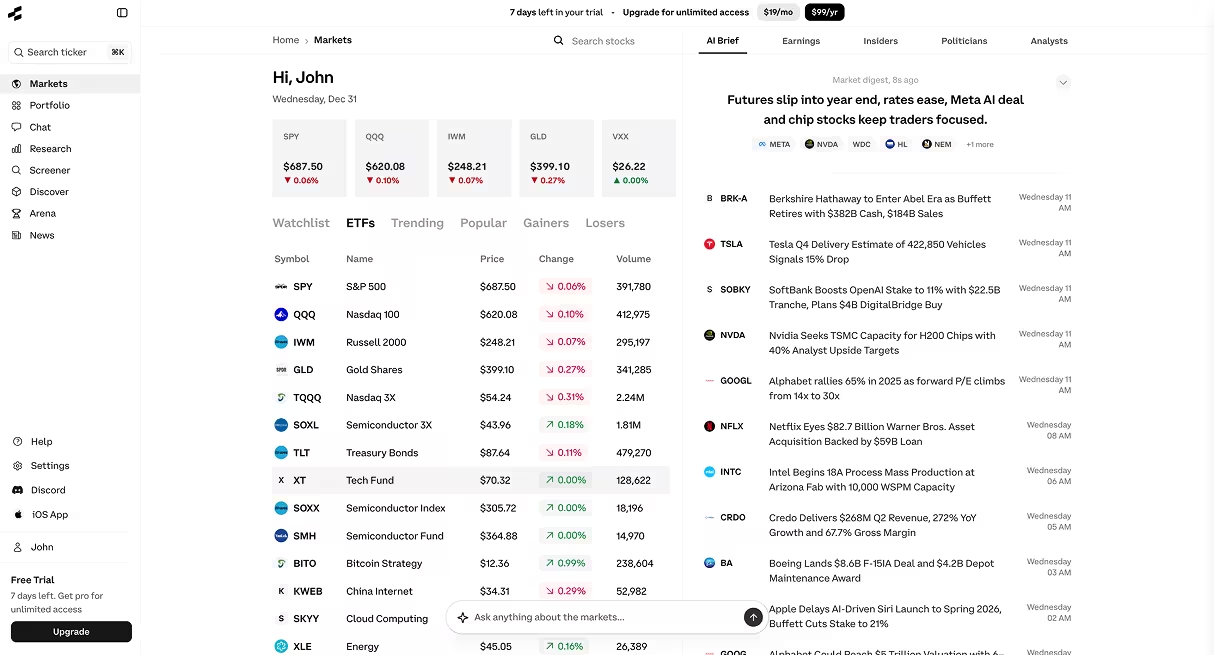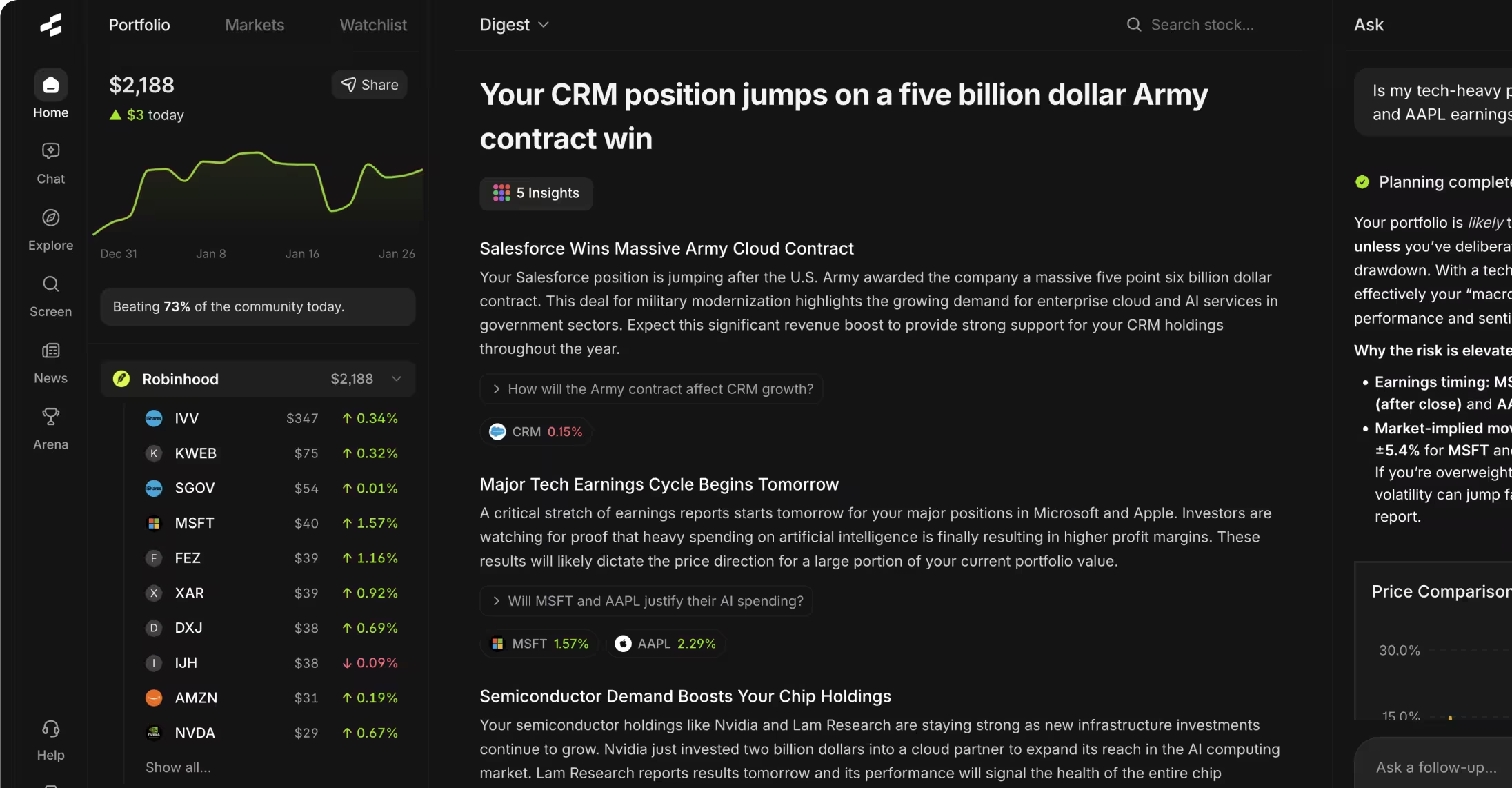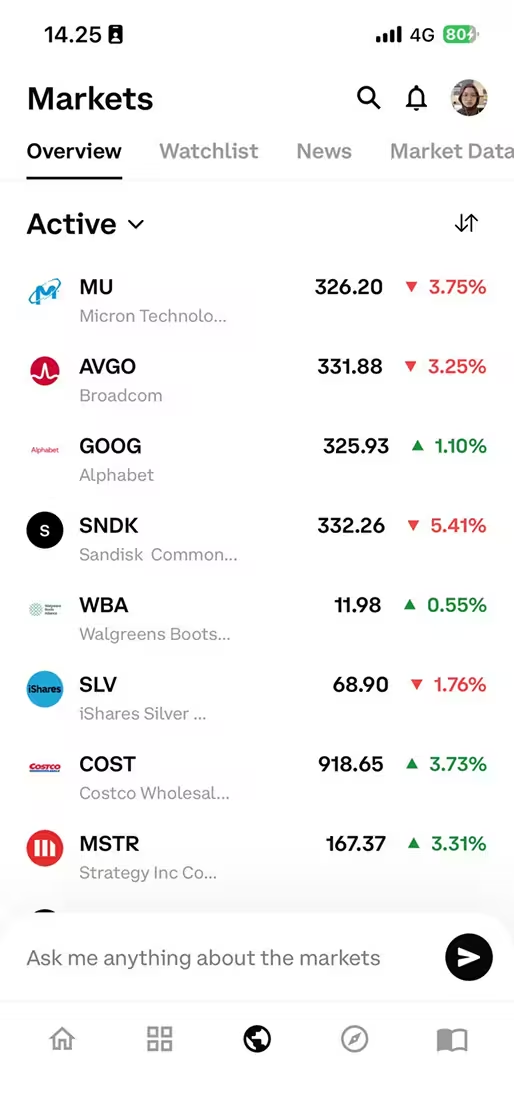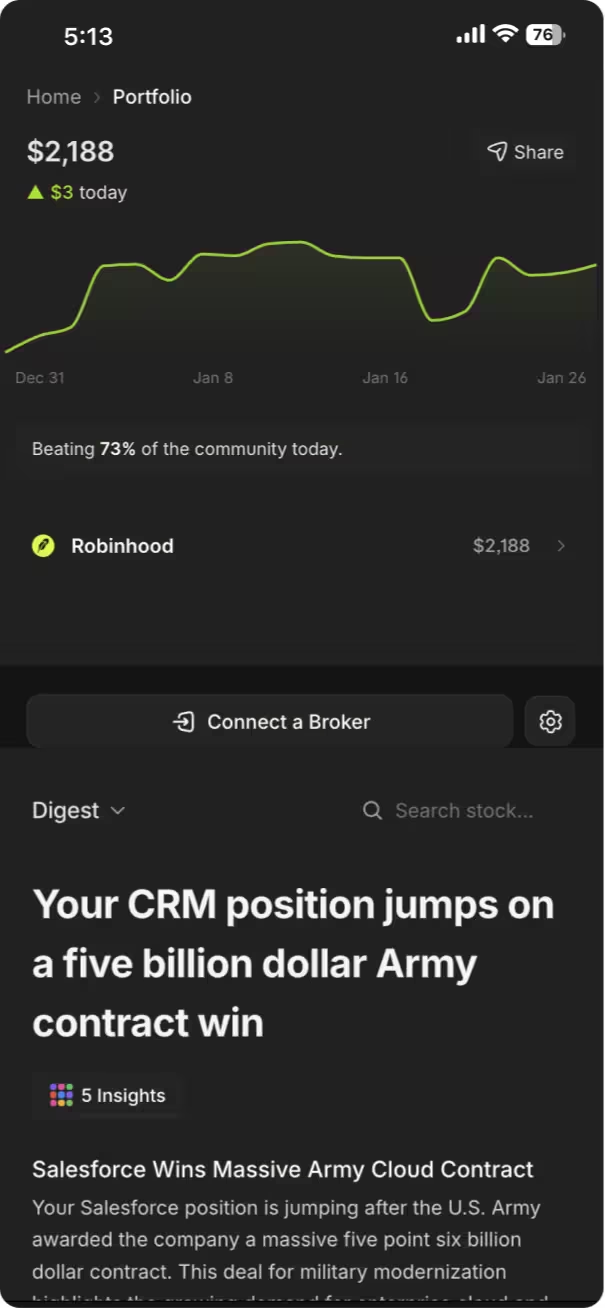



Getting started with Rallies.ai takes less than five minutes and requires no prior experience with AI research tools. After signing up at rallies.ai, you'll have immediate access to the AI Research Assistant, Vibe Screener, portfolio tracking, and deep research features that help you analyze stocks using natural language queries instead of complex financial interfaces.
Key Takeaways
- Rallies.ai offers a free account with access to core features including AI-powered stock research, screening, and portfolio tracking
- The AI Research Assistant answers investment questions in plain English without requiring knowledge of financial formulas or data sources
- Deep Research Mode analyzes over 100 data points on any stock in seconds, consolidating information that would normally take hours to compile manually
- The Vibe Screener lets you describe what you're looking for ("undervalued tech stocks with strong cash flow") instead of setting numerical filters
- Mobile apps for iOS allow you to research stocks, set price alerts, and track your portfolio from anywhere
Table of Contents
- What Is Rallies.ai?
- Creating Your Account
- Using the AI Research Assistant
- Finding Stocks with the Vibe Screener
- Portfolio and Watchlist Features
- Deep Research Mode
- Understanding AI Arena
- Getting Started on Mobile
- Tips for Power Users
- Frequently Asked Questions
- Conclusion
What Is Rallies.ai?
Rallies.ai is an AI-powered investment research platform that simplifies stock analysis through natural language interaction. Instead of navigating complex financial databases or learning specialized screening tools, you can ask questions and describe what you're looking for in plain English.
The platform combines several tools into one interface: an AI research assistant that answers questions about any publicly traded stock, a natural language screener that finds companies matching your criteria, portfolio tracking that monitors your holdings, and deep research reports that compile comprehensive company analysis. Built by WOLF Financial, Rallies.ai aims to make institutional-grade research accessible without requiring a finance background.
The Rallies tutorial experience focuses on getting you research results quickly rather than requiring extensive setup or configuration. Most features work immediately after account creation, with no mandatory questionnaires or lengthy onboarding flows.
AI Research Assistant: A conversational interface that retrieves and analyzes financial data by responding to natural language questions. Unlike general search engines, it pulls from structured financial databases and company filings to provide specific, data-backed answers.
Creating Your Account
Account creation at Rallies.ai requires only an email address and password, taking approximately two minutes to complete. Navigate to the Rallies.ai homepage and click the sign-up button to begin the process.
After entering your credentials, you'll receive a verification email to confirm your address. Once verified, you're immediately directed to the main dashboard with access to all core features. There's no credit card requirement for the free tier, and you can start researching stocks right away without providing additional personal information.
The platform offers both web-based access through any browser and native mobile applications. The iOS app provides the same functionality as the web version, syncing your watchlists, portfolios, and research history across devices.
What You Get with a Free Account
- Unlimited questions to the AI Research Assistant with daily query limits
- Access to the Vibe Screener for finding stocks
- Portfolio tracking for up to three portfolios
- Watchlist management with price alerts
- Basic deep research reports on any stock
- Access to thematic portfolios in Discover
- Real-time market news and updates
Using the AI Research Assistant
The AI Research Assistant responds to investment questions by retrieving data from financial statements, earnings calls, analyst reports, and market data feeds. You can ask about specific metrics ("What's Tesla's gross margin?"), compare companies ("How does Microsoft's P/E ratio compare to Apple's?"), or request explanations of complex topics ("Why did this stock drop after earnings?").
To use the assistant effectively, frame your questions specifically. Instead of "Tell me about Netflix," ask "What was Netflix's subscriber growth last quarter?" or "How much debt does Netflix have?" The AI pulls exact figures from the most recent filings rather than providing general commentary.
Types of Questions That Work Well
The Rallies AI assistant handles several categories of queries with high accuracy. Financial metric questions return specific numbers with context: "Apple's current ratio is 1.07 as of Q4 2023, indicating sufficient short-term liquidity to cover liabilities." Comparison queries place companies side by side: "Amazon's operating margin of 5.7% trails Microsoft's 42.3%, reflecting their different business models."
Historical questions retrieve past performance: "Nvidia stock returned 239% in 2023." Event-driven queries explain market reactions: "The stock dropped 8% following the earnings miss where EPS came in at $0.87 versus $0.92 expected." Industry questions provide context: "The average P/E ratio for semiconductor companies currently sits at 28, above the 10-year average of 22."
Natural Language Query: A question or command phrased in everyday language rather than code or structured search syntax. AI research tools interpret these queries to retrieve relevant financial data without requiring users to know database structures or financial formulas.
How the AI Sources Its Answers
When you ask a question, the AI determines what data it needs (earnings reports, balance sheets, market prices, etc.), retrieves that information from financial databases, and synthesizes an answer. Each response typically includes the data source and date, allowing you to verify the information.
The assistant has access to SEC filings (10-Ks, 10-Qs, 8-Ks), real-time price data, historical performance metrics, analyst estimates, earnings call transcripts, and company guidance. This means you're getting data from primary sources, not summarized articles or opinions.
Finding Stocks with the Vibe Screener
The Vibe Screener translates natural language descriptions into stock filters, eliminating the need to manually set numerical ranges for dozens of criteria. Instead of selecting "P/E ratio between 10 and 20, market cap above $5B, revenue growth above 15%," you can type "profitable mid-cap growth companies trading below market average valuations."
This stock screener app interprets your description, determines which financial metrics match your criteria, and returns a list of companies that fit. Each result shows why it matched your search, displaying the specific metrics that qualified it.
Example Searches That Work
What You Type What It Finds Metrics Used "Dividend stocks with growing payouts" Companies with 3+ years of dividend increases Dividend yield, payout ratio, dividend growth rate "Undervalued tech with strong cash flow" Technology companies with P/E below sector average and positive free cash flow P/E ratio, sector comparison, free cash flow margin "Small companies beating earnings" Small-cap stocks that exceeded analyst EPS estimates in recent quarters Market cap, EPS surprise percentage "Safe stocks for conservative investors" Large-cap companies with low volatility and strong balance sheets Beta, debt-to-equity ratio, market cap, dividend history
Refining Your Results
After seeing initial results, you can refine your search by adding constraints: "Show me those results but only in healthcare" or "Remove companies with debt-to-equity above 0.5." The screener updates the list based on your additional criteria.
You can save searches you run frequently, allowing you to re-run them daily or weekly to see if new companies qualify. This investment research tool approach works well for systematic strategies where you want to apply consistent criteria over time.
Portfolio and Watchlist Features
Portfolio tracking in Rallies.ai monitors your actual holdings, calculates performance, and shows how your allocation breaks down by sector, market cap, and geography. You can create up to three separate portfolios with the free account, useful for tracking different strategies or accounts (retirement, taxable, experimental).
Adding positions requires entering the ticker, number of shares, and purchase price. The platform then tracks current value, unrealized gains or losses, and total return including dividends. Your portfolio dashboard updates with real-time prices during market hours.
Setting Up Your First Portfolio
Click "Portfolio" in the main navigation, then "Create New Portfolio." Name it something descriptive ("Retirement IRA" or "Growth Strategy") and start adding positions. For each holding, the platform pulls current data and shows you metrics like position size as a percentage of total portfolio, cost basis, and current allocation.
The allocation visualizations break down your holdings by sector (technology, healthcare, financials, etc.), helping you spot concentration risk. If 60% of your portfolio sits in one sector, you'll see that immediately in the pie chart.
Watchlist Management and Price Alerts
Watchlists track stocks you're researching but don't own yet. Add any ticker to a watchlist to monitor its price, view key metrics at a glance, and receive notifications when significant events occur (earnings releases, analyst upgrades, major price moves).
Price alerts notify you when a stock hits your target level. Set an alert for "AAPL below $150" and you'll receive a notification if Apple's price drops to that level, allowing you to act on opportunities without constantly checking prices. These alerts work on both the web platform and mobile app.
Watchlist: A saved list of stocks you want to monitor regularly. Unlike a portfolio, which contains stocks you own, a watchlist helps you track potential investments, compare performance across candidates, and receive alerts about companies you're researching.
Deep Research Mode
Deep Research Mode generates comprehensive reports analyzing over 100 data points on any publicly traded company in under 60 seconds. These reports compile information that would typically require visiting multiple websites and reading through lengthy financial documents.
To run a deep research report, navigate to any stock page and click "Deep Research." The AI analyzes the company's financials, competitive position, growth trends, valuation metrics, risk factors, and recent developments, then organizes this into a structured report with sections for business model, financial health, valuation analysis, growth prospects, and risks.
What's Included in Deep Research Reports
Core Sections in Every Report
- ☐ Business model overview and revenue streams
- ☐ Financial metrics across 5+ years (revenue, earnings, margins, cash flow)
- ☐ Valuation analysis with multiple methods (P/E, P/S, DCF-based estimates)
- ☐ Growth trajectory and analyst expectations
- ☐ Competitive positioning within industry
- ☐ Balance sheet strength and debt analysis
- ☐ Risk factors from recent 10-K filings
- ☐ Recent news and material events
- ☐ Insider trading activity
- ☐ Institutional ownership changes
When to Use Deep Research
This feature works best when you're doing initial due diligence on a stock you're unfamiliar with or when you want a comprehensive update on a company you haven't checked in months. The report gives you enough information to decide whether deeper investigation makes sense.
The analysis is educational and data-focused, presenting metrics and trends without making buy or sell recommendations. You'll see "Revenue grew 34% year-over-year but margins compressed from 28% to 23%" rather than "This stock is a great buy." The goal is to surface the information you need to form your own conclusions.
Understanding AI Arena
The AI Arena showcases how different AI models approach stock selection by running them in simulated investment competitions. Each model uses different strategies—some focus on value metrics, others on momentum, technical patterns, or fundamental growth signals—and you can observe their performance over time.
This feature serves an educational purpose rather than providing investment recommendations. By watching how various approaches perform in different market conditions, you can learn about different investing philosophies and how algorithmic strategies work. When growth stocks lead the market, momentum-focused models typically outperform value-oriented ones, demonstrating how strategy effectiveness shifts with market regimes.
What You Learn from AI Arena
The Arena shows you the "thinking" behind each AI's picks—what metrics it prioritized, why it chose certain stocks, and how those decisions played out. One model might favor companies with strong free cash flow and low debt, while another focuses on revenue acceleration and market share gains in emerging sectors.
You can see historical performance of each strategy, drawdowns during market downturns, and how concentrated or diversified the selections are. This transparency helps you understand the tradeoffs inherent in different approaches: aggressive growth strategies deliver higher returns during bull markets but experience sharper drops during corrections.
Getting Started on Mobile
The Rallies app for iOS provides the full platform experience on your phone, with an interface optimized for quick research and portfolio checks. After downloading from the App Store, log in with the same credentials you created on the web.
The mobile interface prioritizes common tasks: checking your portfolio performance, asking quick questions to the AI assistant, viewing watchlist alerts, and running screener searches. The app sends push notifications for price alerts, significant moves in your holdings, and upcoming earnings dates for companies you track.
Mobile-Specific Features
Voice input lets you ask research questions by speaking instead of typing, useful when you're away from a keyboard. The widget for your home screen shows portfolio performance and top movers from your watchlist at a glance without opening the app.
Research history syncs across devices, so questions you asked on your computer appear in your mobile history, and watchlists update in real-time regardless of which device you use. This makes it practical to start research on desktop and continue on mobile, or vice versa.
Tips for Power Users
After you're comfortable with basic features, these approaches can make your research more efficient and comprehensive.
Chain Questions to Go Deeper
Instead of asking one broad question, ask a series of specific ones to build a complete picture. Start with "What was Microsoft's revenue growth last quarter?" then follow up with "How does that compare to the previous four quarters?" and "What did management say about growth expectations?" This approach gets you detailed information organized by topic rather than one long overview.
Save and Compare Multiple Screener Results
Run several different searches representing different strategies, save each one, and compare the overlap. Stocks that appear in multiple searches—say, both "undervalued with strong fundamentals" and "consistent earnings growth"—might warrant closer examination since they meet multiple quality criteria.
Use Watchlists as Research Buckets
Create separate watchlists for different purposes rather than one master list. Have a "potential value plays" list, an "earnings coming up" list, a "monitoring for weakness" list, and a "sector rotation candidates" list. This organization helps you focus on relevant information when market conditions change.
Set Layered Price Alerts
Instead of one alert per stock, set multiple at different levels. For a stock trading at $50 that you want to buy lower, set alerts at $48, $45, and $42. This gives you multiple opportunities to review the situation as price drops rather than hoping you're available exactly when it hits one specific target.
Review Deep Research Before Earnings
Run a deep research report on each portfolio holding about a week before their earnings date. This refreshes your memory on what to expect, what metrics matter most for that company, and what analysts are predicting. You'll be better prepared to evaluate whether results are genuinely surprising or in line with business trends.
Advantages of the Rallies Platform
- Natural language interface eliminates learning curve for complex financial tools
- Consolidates multiple research functions (screening, analysis, tracking) in one place
- Free tier provides substantial functionality without payment requirements
- Mobile and web versions sync seamlessly across devices
- Deep research compiles comprehensive analysis faster than manual research
Limitations to Consider
- AI responses depend on data quality and may occasionally misinterpret complex queries
- Free accounts have daily query limits on AI assistant usage
- Platform focuses on stocks; limited coverage of bonds, options, or other asset classes
- Natural language screening may not capture extremely specific or unusual criteria
- Reports present data but don't replace deep qualitative research on company strategy
Frequently Asked Questions
1. How much does Rallies.ai cost?
Rallies.ai offers a free tier with access to core features including the AI Research Assistant (with daily query limits), Vibe Screener, portfolio tracking for up to three portfolios, watchlists with price alerts, and basic deep research reports. Premium tiers with higher limits and advanced features are available for users who need more extensive research capabilities.
2. What types of stocks can I research on Rallies.ai?
The platform covers all publicly traded stocks on major U.S. exchanges (NYSE, NASDAQ, AMEX), including common stocks, ETFs, and REITs. You can research companies of any market capitalization from large-cap blue chips to small-cap growth stocks. International stocks trading as ADRs (American Depositary Receipts) are also included.
3. How accurate is the AI Research Assistant?
The AI Research Assistant pulls data directly from structured financial databases, SEC filings, and market data feeds, making factual responses (financial metrics, historical prices, company information) highly accurate. The accuracy depends on data source quality and how clearly questions are phrased. Complex questions requiring interpretation or prediction are framed as analysis rather than definitive answers, and responses typically include data sources and dates for verification.
4. Can Rallies.ai execute trades or connect to my brokerage account?
No, Rallies.ai is a stock research platform and investment research tool, not a brokerage or trading platform. It provides analysis, screening, and portfolio tracking for educational purposes but does not execute trades, hold securities, or connect to brokerage accounts. To act on research insights, you'll need to place trades through your chosen brokerage separately.
5. How does the Vibe Screener differ from traditional stock screeners?
Traditional screeners require you to manually set numerical filters for each criterion (P/E ratio less than 15, market cap above $1B, etc.), which assumes you know exactly what thresholds to use. The Vibe Screener interprets natural language descriptions ("growing tech companies with reasonable valuations") and determines appropriate metrics and ranges automatically. You can still refine results, but the initial search is faster and more intuitive for users who don't have specific numbers in mind.
6. What's the difference between a watchlist and a portfolio in Rallies.ai?
A portfolio tracks stocks you actually own, including the number of shares, purchase price, and cost basis, calculating your total return and unrealized gains or losses. A watchlist monitors stocks you're interested in but don't own, showing current prices and metrics without calculating personal returns. Use portfolios to monitor investment performance and watchlists to research potential investments or track market trends.
7. How often is the data updated?
Stock prices update in real-time during market hours (9:30 AM - 4:00 PM ET on trading days). Financial statement data updates when companies file quarterly (10-Q) and annual (10-K) reports with the SEC, typically within 24-48 hours of filing. News and analyst ratings update continuously throughout the day. Historical data and calculated metrics (like trailing twelve-month earnings) update daily after market close.
8. Can I use Rallies.ai on multiple devices?
Yes, your account works across all devices—desktop web browsers, mobile web, and the iOS app. Watchlists, portfolios, research history, and saved screens sync automatically, so changes made on one device appear on all others. You can start research on your computer at work and continue on your phone during your commute with full continuity.
9. What happens when I reach the free tier query limit?
When you reach the daily query limit on the AI Research Assistant, you'll receive a notification indicating the limit has been reached and when it resets (typically at midnight ET). Other features like the screener, portfolio tracking, and viewing stock pages remain fully functional. The limit applies only to new AI assistant questions, not to accessing existing research or using other platform features.
10. How does Deep Research Mode decide what to include?
Deep Research Mode analyzes companies using a framework that covers business fundamentals, financial performance, valuation, growth prospects, and risks. It prioritizes the most material information for each company—for a high-growth tech company, it emphasizes revenue growth and market opportunity; for a mature dividend stock, it focuses on cash flow stability and payout sustainability. The AI determines what matters most based on the company's industry, business model, and current situation rather than applying identical analysis to every stock.
Conclusion
Getting started with Rallies.ai requires minimal setup and no financial expertise, making AI-powered stock research accessible whether you're new to investing or an experienced analyst looking for faster tools. The platform's natural language approach to the AI assistant, screener, and research reports eliminates the learning curve typically associated with professional-grade financial tools.
Start by creating your free account, add a few stocks to a watchlist, and ask the AI Research Assistant specific questions about companies you're curious about. As you get comfortable, explore the Vibe Screener to find new investment ideas and use Deep Research to conduct thorough analysis. For comprehensive guidance on using all platform features, visit the complete Rallies.ai guide.
Remember that Rallies.ai provides educational research tools, not investment advice. Use the platform to gather information and understand companies better, then consult with a qualified financial advisor before making investment decisions based on your specific financial situation and goals.
Start researching smarter. Get Started with Rallies.ai →
References
- U.S. Securities and Exchange Commission. "Company Filings (EDGAR)." sec.gov
- Financial Industry Regulatory Authority. "Investment Research: Getting Started." finra.org
- Dimensional Fund Advisors. "The Size and Value Premium." dimensional.com
- CFA Institute. "Equity Valuation: Applications and Processes." cfainstitute.org
- Rallies.ai. "Platform Features and Documentation." rallies.ai
- Federal Reserve Economic Data (FRED). "Market Indices and Economic Indicators." fred.stlouisfed.org
Disclaimer: This article is for educational and informational purposes only. It does not constitute investment advice, financial advice, trading advice, or any other type of advice. Rallies.ai does not recommend that any security, portfolio of securities, transaction, or investment strategy is suitable for any specific person.
Risk Warning: All investments involve risk, including the possible loss of principal. Past performance does not guarantee future results. Before making any investment decision, you should consult with a qualified financial advisor and conduct your own research.
Written by: Gav Blaxberg
CEO of WOLF Financial | Co-Founder of Rallies.ai